
Preset Properties
Every preset has a set of parameters that apply to the overall sound and function of the preset. These controls affect the overall volume, MIDI, and other master settings found in the Preset Properties section.
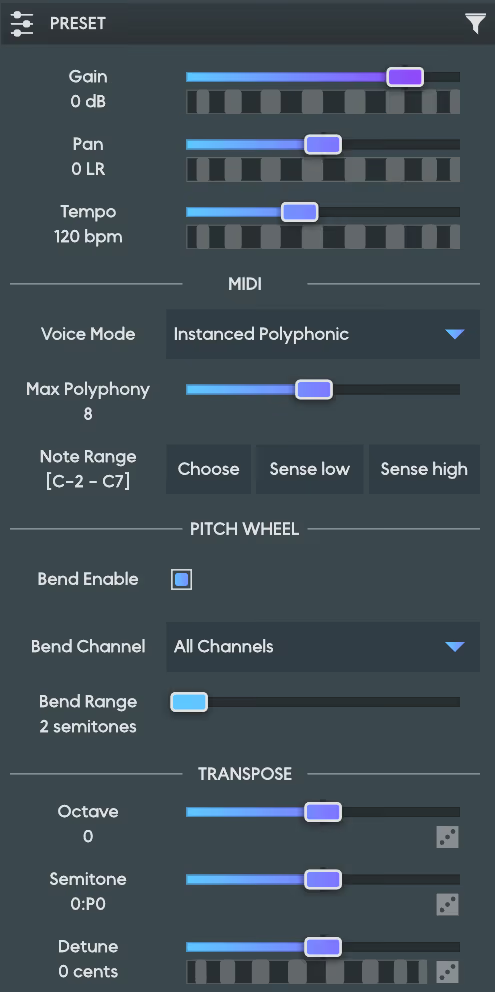
- Gain: The amount of gain that will be applied to the preset's final output signal.
- Pan: Negative values will pan the audio output to the left speaker channel; positive values will pan it toward the right channel. A value of zero will be balanced between the left and right channels. For multichannel configurations, this will pan all pairs of odd and even channels.
- Dry/Wet: This controls the output mix between the completely "dry" input signal (value of 0) and the fully processed "wet" input signal (value of 1). Note: This is only available with the AnukariEffect plugin.
- Tempo: The tempo (in beats per minute) of the main beat clock, which is used for features like synced LFOs. When running Anukari in plugin mode, the tempo is set by the plugin host (DAW) instead, so this slider is shown only in the standalone app.
MIDI Section#
- Voice Mode: The global MIDI control mode affects how Anukari responds to MIDI inputs.
In Singleton mode, you explicitly choose which MIDI note is mapped to each Exciter/Modulator; e.g., if you wish to play a scale, then you will need to design an instrument with an Exciter for each note. This mode requires the most work to create an instrument, but gives you total control.
In Instanced (Polyphonic) mode, the instrument you make is automatically instanced and mapped to all MIDI notes. The number of voice instances controls the maximum polyphony. MIDI Polyphonic Expression (MPE) devices such as the ROLI Seaboard or LinnStrument control each note's pitch, pressure and Y movement on their own.
There is no separate MPE mode: every preset responds to an MPE controller, and an ordinary MIDI keyboard always plays. The settings that describe your MPE controller apply to every preset and are found in Preferences > MPE. A preset saved in the MPE voice mode of an earlier version opens as Instanced (Polyphonic) and still responds to an MPE controller.
In Singleton mode there is one instrument rather than one per note, so an MPE controller's per-note pitch bend, pressure and Y come from the key pressed most recently, and its pitch bend retunes the whole instrument.
- Max Polyphony: The number of distinct notes that can be played at a time before the least recently played note will be replaced by a new note. Larger values use more system resources and are more taxing on the CPU. (Not shown in Singleton mode.)
- Legato: Play the instrument legato, the way a mono synth plays a lead or bass. A note played while another note is still held changes the pitch without retriggering anything: envelopes keep running, LFOs keep their phase, and Mallets are not struck again. Set Max Polyphony to 1 for a classic mono lead.
- Glide: Portamento: how long a legato note change takes to slide to its new pitch. At zero, the pitch changes at once. This slider is shown only when Legato is on.
- Note Range: This sets the lowest and highest MIDI notes that the instrument will respond to. This can be useful, for example, to prevent the instrument from responding to high notes that you have determined are likely to cause physics explosions.
Click the "Choose" button to manually assign the note range for the preset using an on-screen piano keyboard. Click "Sense Low" to assign the lowest note for the preset by pressing any note on your MIDI input device. Click "Sense High" to assign the highest note for the preset by pressing any note on your MIDI input device.
Pitch Wheel Section#
- Bend Enable: Whether MIDI pitch bend messages should be automatically applied globally to the instrument. You may wish to disable this if you are using pitch bend as a modulation source and want full control.
- Bend Range: The number of semitones (up and down) of pitch bend range for global MIDI pitch bend messages. This is the range of a keyboard's pitch wheel. The range of an MPE controller's per-note pitch bend is set in Preferences > MPE.
Transpose Section#
- Octave: The number of octaves by which to raise or lower the pitch of the entire preset. Careful! Depending on the preset, large values may cause physics explosions.
- Semitone: The number of semitones (interval) by which to raise or lower the pitch of the entire preset.
- Detune: The number of cents by which to raise or lower the pitch of the entire preset.